Tool Engineering
Semantic Capability and Tool Engineering
Skill 8 of 9 | Pillar III: Trust & Security
The interface design discipline for the age of agents—creating tools that are discoverable, understandable, and safe.
The Agent's User Interface
Here's a perspective shift that separates amateur agent builders from professionals: tools are the user interface for agents. Just as poorly designed UI frustrates human users, poorly designed tools frustrate agents—leading to errors, inefficiency, and failed tasks.
Skill 8 represents the critical discipline of designing, building, and managing the tools that agents use to interact with the world. Agents extend their capabilities through tools—functions, APIs, and services that allow them to perform actions beyond language generation. The quality of these tools is a primary determinant of agent performance.
Consider the difference: a tool with a vague description like "process data" gives the agent no guidance on when to use it or what to expect. A tool with a precise description—"Convert CSV file to JSON format, preserving column headers as keys"—tells the agent exactly what it does, when it's appropriate, and what the output will look like.
This skill addresses the art and science of creating tools that are discoverable (agents can find them), understandable (agents know when and how to use them), and safe (agents can use them without causing harm). Master these principles, and your agents will work with surgical precision. Ignore them, and you'll spend endless hours debugging why your agent chose the wrong tool or passed invalid parameters.
The Four Sub-Skills of Tool Engineering
| Sub-Skill | Focus Area | Key Concepts |
|---|---|---|
| 8.1 Function Calling and Tool Definitions | Designing clear schemas and robust error handling | JSON Schema, OpenAPI, structured errors |
| 8.2 Dynamic Tool Discovery and Composition | Enabling agents to find and chain tools | Tool registries, semantic search, composition |
| 8.3 Tool UX Design for Agents | Crafting descriptions for semantic usability | Clear descriptions, examples, semantic altitude |
| 8.4 Agent Skills Standard and Progressive Disclosure | Modular, scalable tool packaging | SKILL.md format, progressive disclosure |
8.1 Function Calling and Tool Definitions
Modern LLMs support function calling (also called tool use), where the model outputs a structured request to invoke a function with specific parameters. The quality of your tool definitions directly impacts how accurately agents use them.
Designing Clear Tool Schemas
Core Principle: Every tool must have a precise schema defining its inputs, outputs, and behavior.
A tool schema is typically defined using JSON Schema or OpenAPI. It specifies the function name, description, parameters (with types, constraints, and descriptions), and return value. Ambiguous or incomplete schemas lead to agent errors.
Example JSON Schema:
{
  "name": "get_weather",
  "description": "Get current weather for a location",
  "parameters": {
    "type": "object",
    "properties": {
      "location": {
        "type": "string",
        "description": "City name, e.g., 'San Francisco'"
      },
      "unit": {
        "type": "string",
        "enum": ["celsius", "fahrenheit"],
        "description": "Temperature unit"
      }
    },
    "required": ["location"]
  }
}
Best Practices:
- Use descriptive parameter names that convey meaning
- Provide examples in descriptions (e.g., "City name, e.g., 'San Francisco'")
- Specify constraints using enums, ranges, and patterns
- Mark required parameters explicitly
- Document default values for optional parameters
Implementing Robust Error Handling
Core Principle: Tools must return structured error messages that agents can understand and act upon.
A tool that returns a cryptic error code or stack trace is useless to an agent. Error responses should be structured (JSON), include a human-readable message, an error code, and guidance on how to fix the problem.
Structured Error Response:
{
  "error": {
    "code": "MISSING_PARAMETER",
    "message": "Required parameter 'location' is missing",
    "parameter": "location",
    "suggestion": "Provide a city name, e.g., 'San Francisco'"
  }
}
Benefits: Enables agents to self-correct without human intervention, reduces retry loops, and improves user experience.
Function Calling Protocols
Different LLM providers have different function calling implementations:
- OpenAI: Uses
toolsparameter withfunctiontype; model returnstool_callsin response - Anthropic: Uses
toolsparameter; model returnstool_usecontent blocks - Google: Uses
function_declarations; model returnsfunction_call
Implementation Considerations: Handle multi-turn function calling (agent calls tool, receives result, continues reasoning), parallel function calls (multiple tools invoked simultaneously), function call validation, and graceful error recovery.
8.2 Dynamic Tool Discovery and Composition
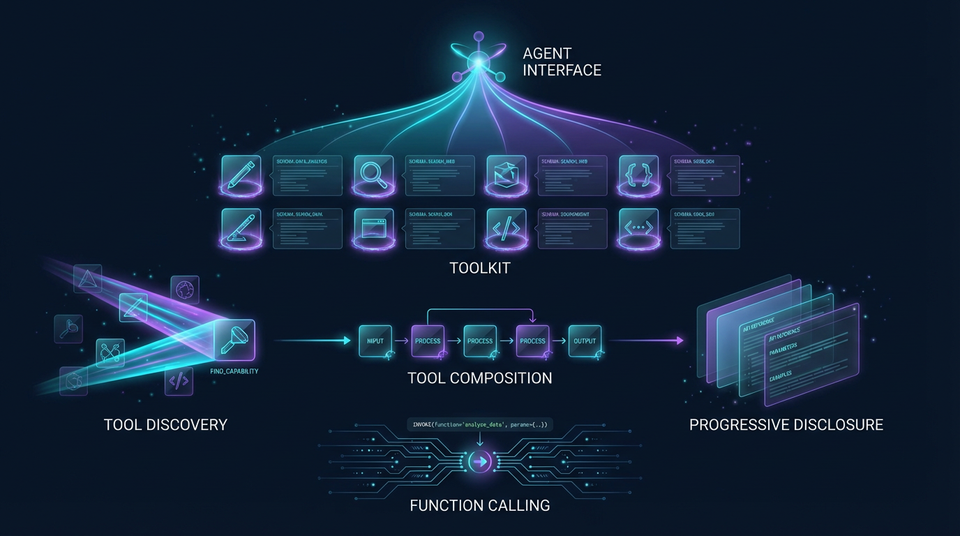
In large ecosystems, it's impossible to hardcode all tools into the agent's prompt. Agents must discover tools dynamically based on the task at hand.
Tool Registries and Catalogs
Core Principle: A searchable catalog of available tools, indexed by capability and domain.
A tool registry is a database of available tools with metadata: name, description, category, tags, version, schema. Agents query the registry to find tools that match their current needs.
Registry Metadata:
- Name and description
- Category (e.g., "data processing", "communication", "finance")
- Tags (e.g., "weather", "API", "database", "file-system")
- Version and deprecation status
- Usage statistics and ratings
- Authentication requirements
Implementation: Use a database (PostgreSQL, MongoDB) or specialized tool registry service. Implement search APIs with filtering by category, tags, and semantic similarity.
Semantic Search for Tools
Core Principle: Agents find tools by describing what they need in natural language.
Using embedding-based search, agents can query the tool registry with natural language (e.g., "I need to convert currency"). Tool descriptions are embedded into vectors, and similarity search finds the most relevant tools.
Technical Implementation:
- Embed tool descriptions using an embedding model (OpenAI embeddings, sentence transformers)
- Store embeddings in a vector database (Pinecone, Weaviate, Qdrant, Chroma)
- At query time, embed the agent's query
- Retrieve top-k similar tools based on cosine similarity
- Present tools to agent for selection
Benefits: Intuitive tool discovery, handles synonyms and paraphrasing, scales to thousands of tools without overwhelming the agent's context.
Tool Composition and Chaining
Core Principle: Advanced agents chain multiple tools together to solve complex problems.
Tool composition means using the output of one tool as the input to another. For example: search_documents() → extract_entities() → lookup_entity_info(). Tools must be designed with composable interfaces (standardized input/output formats).
Design Patterns:
- Pipeline: Sequential tool execution where each tool's output feeds the next
- Fan-out/Fan-in: Parallel tool execution with result aggregation
- Conditional: Tool selection based on intermediate results
- Iterative: Repeated tool calls until a condition is met
Implementation Requirements: Define standard data formats (JSON), implement tool orchestration logic, handle errors in multi-step workflows, provide rollback mechanisms for failed chains.
8.3 Tool UX Design for Agents
The "user interface" for an agent is the tool description and schema. Poor UX leads to agent confusion and errors—just as poor UI leads to human frustration.
Writing Clear, Unambiguous Descriptions
Core Principle: Explain not just what the tool does, but when to use it and what the inputs/outputs mean.
A good tool description includes:
- What: What does the tool do?
- When: When should the agent use it?
- Inputs: What do the parameters mean? What format?
- Outputs: What will the tool return? What format?
- Constraints: What are the limitations?
Example:
Tool: get_weather
Description: Retrieves current weather conditions for a specified location.
Use this when the user asks about current weather, temperature, or conditions.
Input: location (string) - City name or "City, Country" format, e.g., "Paris, France"
Input: unit (string) - Temperature unit, either "celsius" or "fahrenheit". Defaults to celsius.
Output: JSON object with temperature, conditions, humidity, wind speed.
Limitations: Only provides current weather, not forecasts. Requires internet connection.
Providing Tool Examples
Core Principle: Include example invocations to guide the agent.
Examples are the fastest way for agents to learn how to use a tool. Provide multiple examples covering common use cases and edge cases.
Example Invocations:
Example 1: Get weather in Celsius
Input: {"location": "Tokyo", "unit": "celsius"}
Output: {"temperature": 18, "conditions": "Partly cloudy", "humidity": 65}

Example 2: Get weather in Fahrenheit
Input: {"location": "New York", "unit": "fahrenheit"}
Output: {"temperature": 72, "conditions": "Sunny", "humidity": 45}

Example 3: Location with country specification
Input: {"location": "London, UK", "unit": "celsius"}
Output: {"temperature": 12, "conditions": "Rainy", "humidity": 85}
Benefits: Accelerates agent learning, reduces trial-and-error, improves first-call success rate dramatically.
Optimizing Semantic Altitude
Core Principle: Balancing specificity and flexibility in tool descriptions.
Semantic altitude refers to the level of abstraction in a tool description. Too specific (low altitude) and the tool is inflexible; too general (high altitude) and the agent doesn't know when to use it.
- Low Altitude (too specific): "Get weather in San Francisco in Fahrenheit"
- Optimal Altitude: "Get current weather for any location in specified units"
- High Altitude (too general): "Get information about something"
Best Practice: Start with medium altitude, adjust based on agent performance. Use A/B testing to find the optimal altitude for each tool.
8.4 Agent Skills Standard and Progressive Disclosure
As tool ecosystems grow, managing hundreds or thousands of tools becomes a challenge. The Agent Skills Standard provides a blueprint for packaging tools in a modular, scalable way.
The Agent Skills Standard
Core Principle: Modular skill definitions with progressive disclosure to prevent context overload.
Each skill is a directory containing:
- SKILL.md: The interface—skill name, brief description, when to use it (always loaded)
- Supporting resources: Detailed documentation, schemas, examples (loaded only when needed)
Directory Structure:
skills/
  weather/
    SKILL.md          # Interface (always loaded)
    detailed_docs.md  # Loaded on demand
    schema.json       # Loaded on demand
    examples/         # Loaded on demand
  currency_conversion/
    SKILL.md
    detailed_docs.md
    schema.json
    examples/
Progressive Disclosure
Core Principle: Load information just-in-time to preserve context window.
Progressive disclosure means agents initially see only skill names and brief descriptions (low context cost). Only when a skill is deemed relevant does the agent load the full documentation (high context cost).
The Flow:
- Agent sees list of available skills (names and one-line descriptions)
- Agent identifies relevant skills based on task
- Agent loads full documentation for selected skills only
- Agent uses loaded skills to complete task
Benefits: Reduces context window usage dramatically, scales to hundreds of skills without performance degradation, improves agent focus by filtering irrelevant tools.
Real-World Success and Failure Scenarios
Success: Enterprise Tool Ecosystem
Scenario: Financial services firm builds tool registry with 500+ tools.
Impact: Agents can dynamically discover and use tools, 10x capability expansion.
Implementation: Semantic search with embeddings, Agent Skills standard, progressive disclosure.
Outcome: Agents handle complex workflows without hardcoded tool lists.
Failure: Ambiguous Tool Schema
Scenario: Tool with vague parameter description causes agent to pass wrong data type.
Impact: 30% error rate, poor user experience, manual intervention required.
Root Cause: Schema said "date" without specifying format (ISO 8601? Unix timestamp? MM/DD/YYYY?).
Mitigation: Precise schema with format examples, input validation, structured error messages.
Success: Tool Composition for Complex Workflows
Scenario: Legal research agent chains document search, entity extraction, and case law lookup.
Impact: 5x faster research, comprehensive analysis, high accuracy.
Implementation: Composable tool interfaces, standardized JSON formats, orchestration logic.
Outcome: Agents solve complex problems without human intervention.
The Principle-Based Transformation
From Ad-Hoc Tool Integration...
- Poorly documented APIs with no examples
- Ambiguous function signatures that confuse agents
- Cryptic error messages that provide no guidance
- No tool discovery mechanism—hardcoded lists
- No versioning—breaking changes break agents
To Systematic Tool Engineering...
- Understanding tools as the agent's user interface
- Mastering semantic usability and discoverability principles
- Applying software engineering best practices to tool design
- Building ecosystems of composable, reusable tools with progressive disclosure
Transferable Competencies
Mastering tool engineering builds expertise in:
- API Design: RESTful design, OpenAPI, JSON Schema, versioning strategies
- Interface Design: Usability principles, documentation, examples, error handling
- Semantic Engineering: Natural language understanding, embedding-based search
- Software Engineering: Modularity, composability, error handling, testing
- Information Architecture: Categorization, tagging, metadata design
Common Pitfalls to Avoid
- Ambiguous schemas: Vague parameter descriptions lead to agent errors
- Poor error messages: Cryptic errors prevent agent self-correction
- No examples: Agents struggle to learn tool usage without examples
- Wrong semantic altitude: Too specific or too general descriptions
- No tool discovery: Hardcoded tool lists don't scale
- Non-composable tools: Incompatible input/output formats prevent chaining
- Context overload: Loading all tool documentation upfront wastes context
- No versioning: Breaking changes break existing agents
- Ignoring usability: Treating tools as technical APIs rather than agent interfaces
Implementation Guidance
For Tool Engineers: Design clear JSON Schema specifications for all tools. Implement structured error handling with actionable messages. Write comprehensive tool descriptions with when-to-use guidance. Provide multiple examples covering common and edge cases. Test tools with actual agents to identify usability issues.
For Architects: Design tool registry architecture with semantic search capabilities. Define tool categorization and tagging standards. Plan for tool composition and orchestration. Adopt the Agent Skills standard for modular packaging. Establish tool quality and governance processes.
For Platform Teams: Build tool registry infrastructure with APIs. Implement embedding-based semantic search. Create tool development SDKs and templates. Monitor tool usage and performance metrics. Maintain tool documentation standards.
Looking Forward
The field is evolving toward:
- AI-Generated Tools: LLMs generating tools from natural language descriptions
- Self-Extending Agents: Agents that create new tools to fill capability gaps
- Tool Learning: ML models that learn optimal tool usage patterns from experience
- Universal Tool Standards: Industry-wide standards for tool definitions (OASF evolution)
- Multi-Modal Tools: Tools that seamlessly handle text, images, audio, and video
- Tool Marketplaces: Thriving ecosystems of third-party tools for agents
Next Skill: Security & Resilience — Protecting agents against adversarial threats.
Back to: The Nine Skills Framework | Learn
Subscribe to the Newsletter → for weekly insights on building production-ready AI systems.